Three-Tier Web Application Architecture in a VPC
A foundational three-tier web app architecture on AWS that separates the web, application, and database layers across Public Subnets, Private Subnets, and Database Subnets.
Architecture diagram
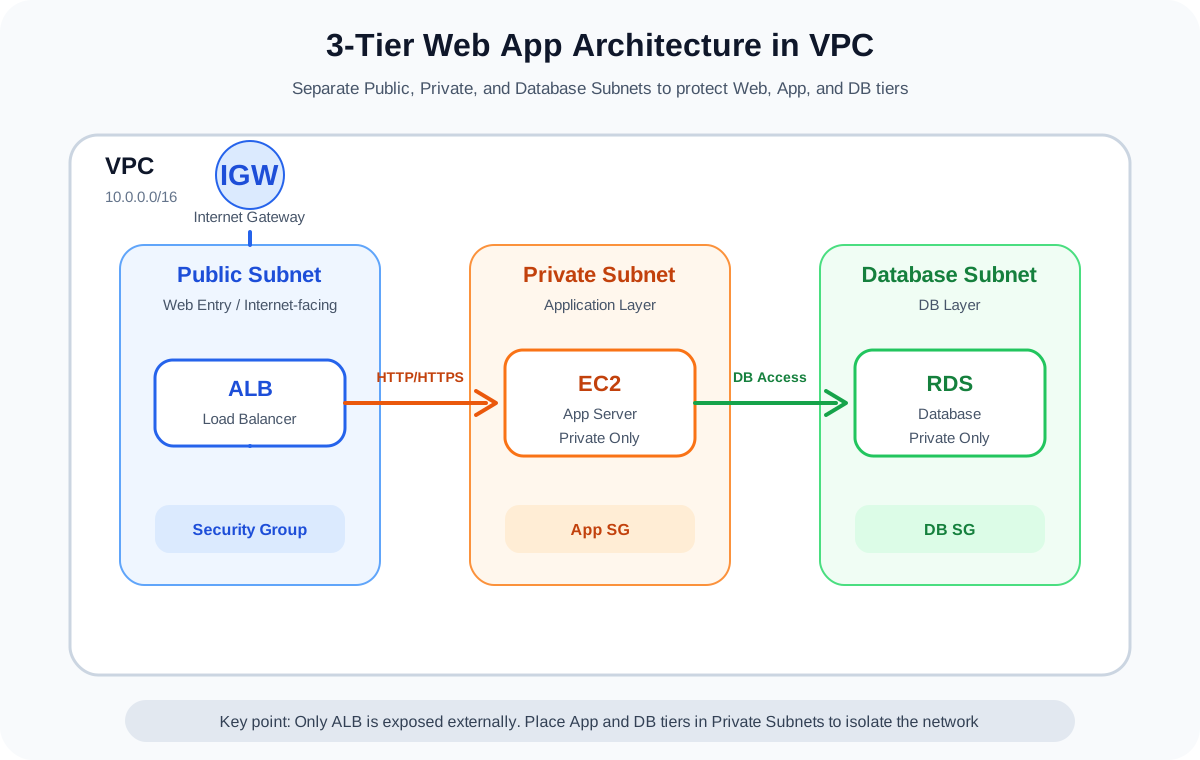
AWS services used
Click a service name to review it on the term detail page.
Overview
This architecture splits a web application into the following three tiers:
- Presentation tier
- Application tier
- Database tier
On AWS, you implement it by combining VPC, Subnets, Route Tables, Security Groups, ALB, EC2, RDS, and more.
We do not use this pattern in this project's MVP, but it is a foundational architecture that is extremely important for the SAA exam.
Architecture Diagram
flowchart TD
    User[User]
    IGW[Internet Gateway]
    ALB[Application Load Balancer]
    PublicSubnetA[Public Subnet AZ-a]
    PublicSubnetC[Public Subnet AZ-c]
    PrivateSubnetA[Private Subnet App AZ-a]
    PrivateSubnetC[Private Subnet App AZ-c]
    DBSubnetA[Private DB Subnet AZ-a]
    DBSubnetC[Private DB Subnet AZ-c]
    EC2A[EC2 App AZ-a]
    EC2C[EC2 App AZ-c]
    DBA[(RDS Primary)]
    DBC[(RDS Standby)]
    NAT[NAT Gateway optional]
    CW[CloudWatch]
User -->|HTTPS| IGW
IGW --> ALB
ALB --> PublicSubnetA
ALB --> PublicSubnetC
PublicSubnetA --> EC2A
PublicSubnetC --> EC2C
EC2A --> PrivateSubnetA
EC2C --> PrivateSubnetC
EC2A -->|DB connection| DBA
EC2C -->|DB connection| DBA
DBA --> DBSubnetA
DBC --> DBSubnetC
DBA -.synchronous replication.-> DBC
EC2A -->|when outbound is needed| NAT
EC2C -->|when outbound is needed| NAT
EC2A -.logs.-> CW
EC2C -.logs.-> CW
```
What You Can Achieve
| Item | Description |
|---|---|
| Tier separation | Cleanly separates the web entry point, application, and database at the network level |
| Improved security | Keeps the database out of public subnets, avoiding internet exposure |
| Higher availability | Deploys the application tier and DB tier across multiple AZs |
| Scalability | The application tier is easy to swap out for Auto Scaling or ECS |
| Real-world design literacy | Lets you learn the relationships between VPC, subnets, route tables, and Security Groups |
AWS Services Used
| Service | Role |
|---|---|
| Amazon VPC | Network boundary for the entire application |
| Public Subnet | Placement for resources that need external connectivity such as ALB and NAT Gateway |
| Private Subnet | Placement for application servers |
| Database Subnet | Non-public subnet that hosts Amazon RDS |
| Application Load Balancer | Distributes HTTPS requests across the application tier |
| Amazon EC2 | Application servers |
| Amazon RDS | Relational database |
| Amazon CloudWatch | Metrics and log monitoring |
| AWS IAM | Access control for EC2 and operators |
Request Flow
- The user accesses the website over HTTPS
- ALB receives the request through the Internet Gateway
- ALB forwards the request to EC2 instances inside the Private Subnet
- The EC2 application connects to RDS Primary
- When RDS Multi-AZ is enabled, the primary synchronously replicates to the standby
- EC2 and RDS metrics are observed through CloudWatch
- Only when outbound traffic is needed (for example, fetching external packages), the Private Subnet egresses via NAT Gateway
Design Considerations
Availability
Create Public Subnets, Private Subnets, and Database Subnets across multiple Availability Zones.
The ALB spans multiple AZs to distribute requests.
Using RDS Multi-AZ allows automatic failover to the standby instance when the primary fails.
Security
Expose only the ALB to the internet.
Place EC2 in the Private Subnet, and configure the Security Group to allow inbound traffic only from the ALB.
Place RDS in the Database Subnet, and configure the Security Group to allow only the DB port from the application-tier EC2 instances.
Cost
ALB, EC2, RDS, and NAT Gateway tend to incur fixed or continuous charges.
This project's MVP prioritizes low cost and does not adopt this pattern. We treat it purely as a learning and SAA-preparation reference architecture.
Operations
In CloudWatch, monitor EC2 CPU utilization, ALB 5xx counts, and RDS connection count and CPU utilization.
Using SSM Session Manager reduces the need for SSH bastion hosts.
SAA Exam Focus
- Understand the roles of Public and Private Subnets
- Place the ALB in the Public Subnet, applications in the Private Subnet
- Place the database in a Private Subnet — never expose it directly to the internet
- Security Groups are stateful, NACLs are stateless
- RDS Multi-AZ improves availability; Read Replicas improve read performance
- A NAT Gateway is required when a Private Subnet needs outbound internet access
- Consider VPC Endpoints when you want private connectivity to S3 or DynamoDB
Caveats
- NAT Gateway tends to be expensive on fixed costs — use it carefully in a personal MVP
- RDS keeps incurring charges through storage, backups, and forgotten running instances
- Never place a database in a Public Subnet
- Never open SSH (port 22) to 0.0.0.0/0 on EC2
- Misconfigured route table associations are a common cause of connectivity issues
- Do not confuse the purpose of Multi-AZ (availability) and Read Replica (read scalability)
Related Terms
Related Comparisons
Role in this Project
The three-tier web app architecture inside a VPC is the canonical pattern for understanding AWS network design.
We do not adopt it in this project's main build because of cost, but it is an extremely important architecture for SAA preparation and for explaining your AWS skills in interviews.
Explore more AWS architectures
For the SAA exam, understanding AWS as architecture patterns matters more than memorizing individual services.
Related architectures
Static Hosting
S3 + CloudFront Static Website Architecture
Explains the baseline architecture for delivering a static site placed in S3 quickly and securely through CloudFront.
Serverless
API Gateway + Lambda + DynamoDB Serverless API Architecture
A foundational serverless API architecture that uses API Gateway as the entry point, executes processing in Lambda, and stores data in DynamoDB. Suited for contact forms and small-scale APIs.
High Availability
ALB + Auto Scaling + RDS Multi-AZ High Availability Architecture
Distribute web servers across multiple AZs, balance load with ALB, and improve availability with Auto Scaling and RDS Multi-AZ.